Techniques
How to recover files from a Seagate External Drive on a Mac
7 replies 2426 views
7 replies 2426 views
03-16-2025, 11:30 PM
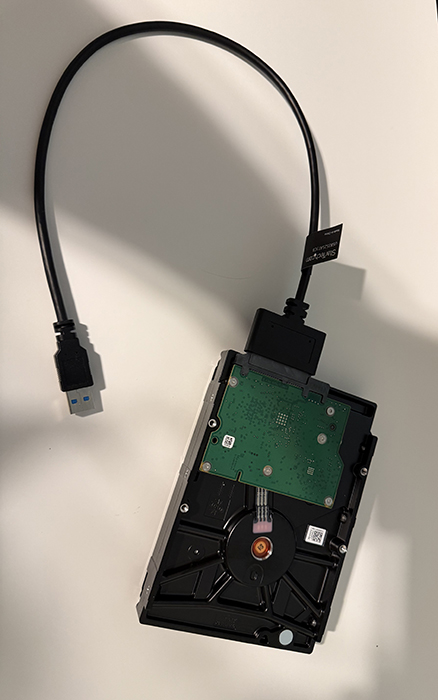
One thing I have noticed is there is no port for a power cord. How do you get the external drive power?
What would be your recommendations?
I've got two external drives that have stopped working over the last few months. They carry all my photos up until September 2023. I have one new drive that holds photos from September 2023 til now.
Or do we have any members that know how to recover lost files?
Or recommend a company that can do it for a reasonable price.
03-17-2025, 09:50 AM
Hi, I have used Salvagedata in California to retrieve damaged hard drives. They are not cheap but effective.
Phone is:800-972-3282, website: https://case.salvagedata.com. Good Luck!
Phone is:800-972-3282, website: https://case.salvagedata.com. Good Luck!
03-17-2025, 01:23 PM
Some drives derive their power from the computer via USB and don't need a power cord.
There are lots of file recovery apps. Google it. I use Recuva.
If you can't access the drives at all from your computer, you'll have to take them to a place which pulls the data directly off the physical disk surface. It could cost thousands.
There are lots of file recovery apps. Google it. I use Recuva.
If you can't access the drives at all from your computer, you'll have to take them to a place which pulls the data directly off the physical disk surface. It could cost thousands.
03-17-2025, 02:14 PM
DataTech Labs next to Microcenter does data recovery. No, it’s not cheap.
03-17-2025, 03:10 PM
If the hard drives are not physically damaged, it's likely that a local computer support person or company can recover the files for you. From what you have described, I doubt you will have to use one of the very expensive labs to get the data. If I were you, that's what I would try first.
A number of years ago, an external hard drive of mine fell very hard on the floor and the top cover came off (it wasn't the first time it fell). I was not able to recover the data, but I researched it and did find several local computer people who were willing to try, and who would have been able to do it if there hadn't been physical scratches and other damage on the drive.
A number of years ago, an external hard drive of mine fell very hard on the floor and the top cover came off (it wasn't the first time it fell). I was not able to recover the data, but I researched it and did find several local computer people who were willing to try, and who would have been able to do it if there hadn't been physical scratches and other damage on the drive.
03-17-2025, 04:51 PM
For future reference, it’s very low cost insurance to save a copy to the cloud. BackBlaze, for example will automatically save whatever you want not only from your computer, but also from connected external drives.
03-17-2025, 10:27 PM
http://www.cgsecurity.org
Get testdisk and photorec
TestDisk checks the partition and boot sectors of your disks.
Photorec will recover the photos from the partition.
Free. I have used them to recover failing camera memory cards.
Regarding backup, best to have multiple backups, for example, 3 USB drives as backup that your rotate the backup and a cloud backup (at least for important stuff).
Get testdisk and photorec
TestDisk checks the partition and boot sectors of your disks.
Photorec will recover the photos from the partition.
Free. I have used them to recover failing camera memory cards.
Regarding backup, best to have multiple backups, for example, 3 USB drives as backup that your rotate the backup and a cloud backup (at least for important stuff).
03-17-2025, 11:03 PM
Very thankful with all your ideas. I'll keep working on it. Probably try DataTech if I can't get it done. No physical damage to my drives. They both worked off and on before they crashed for good. I am down in the Denver area usually once a week.
Login to post a reply.
All images on this site are copyrighted by the photographers and are intended for viewing only. They are
not to be downloaded or reproduced in any way without the written permission of the photographer.
not to be downloaded or reproduced in any way without the written permission of the photographer.