Techniques
Photoshop 2022 Printing Problems
6 replies 887 views
6 replies 887 views
10-28-2021, 02:58 PM
I do my editing on an iMac.
I downloaded the new Photoshop 2022 yesterday. Having a problem printing to my Canon Pixma Pro-100. In Photoshop 2021, my printer comes up under Automate under File where I find my printer, Canon Print Studio Pro.
I've tried several suggestions but I still can't get Canon Print Studio Pro to show up under Automate in the new 2022 Photoshop.
Any suggestions.
Steve Johnson
I downloaded the new Photoshop 2022 yesterday. Having a problem printing to my Canon Pixma Pro-100. In Photoshop 2021, my printer comes up under Automate under File where I find my printer, Canon Print Studio Pro.
I've tried several suggestions but I still can't get Canon Print Studio Pro to show up under Automate in the new 2022 Photoshop.
Any suggestions.
Steve Johnson
10-28-2021, 03:00 PM
Screen shot of Photoshop 2021
10-28-2021, 03:03 PM
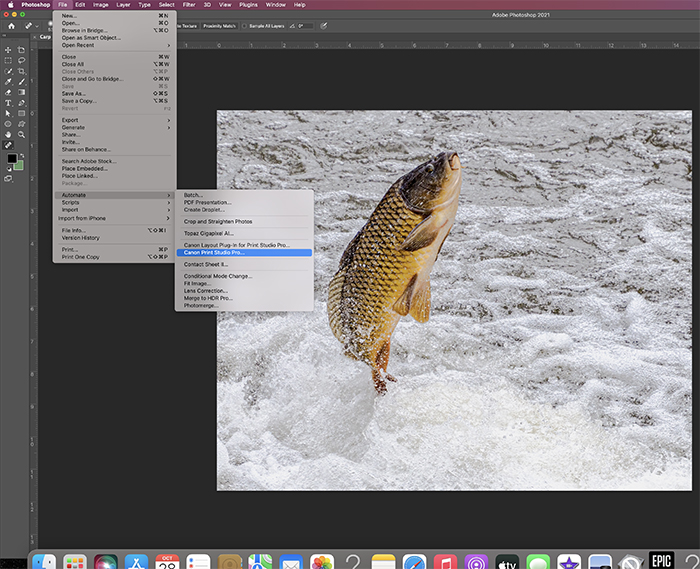
10-28-2021, 07:07 PM
Steve,
I have the same setup as you: the new Photoshop upgrade and a Canon Pro-100 printer. To my great relief I didn't have any problem accessing or printing a test page. Sorry I couldn't diagnose the problem you have encountered, but ultimately it can work.
P.S.: Nice photo of the leaping fish!
I have the same setup as you: the new Photoshop upgrade and a Canon Pro-100 printer. To my great relief I didn't have any problem accessing or printing a test page. Sorry I couldn't diagnose the problem you have encountered, but ultimately it can work.
P.S.: Nice photo of the leaping fish!
11-06-2021, 04:58 PM
Steve,
Well now I'm having the same problem you did. I realized I was trying to print from my 2021 version instead of the new one. Have you found a way to get the Print Studio Pro to show up. I have it set as an action, but get this popup: "the command "Canon Print Studio Pro" is not currently available."
Mike
Well now I'm having the same problem you did. I realized I was trying to print from my 2021 version instead of the new one. Have you found a way to get the Print Studio Pro to show up. I have it set as an action, but get this popup: "the command "Canon Print Studio Pro" is not currently available."
Mike
11-07-2021, 10:19 AM
I can print when I hit print but the quality is terrible. I cannot adjust colors, brightness and I can't use profiles.
If I go back to Photoshop 2021, I can access Canon Print Studio Pro and do all the necessary adjustments.
I think IF I can find where those are under Automate, I could copy and paste into 2022.
No Lucks Yet.
If I go back to Photoshop 2021, I can access Canon Print Studio Pro and do all the necessary adjustments.
I think IF I can find where those are under Automate, I could copy and paste into 2022.
No Lucks Yet.
11-07-2021, 12:29 PM
Searching the interwebs indicates that this is a known problem. FWIW, I had a Pro-1 until recently and had better results going through the Photoshop printing process.
Login to post a reply.
All images on this site are copyrighted by the photographers and are intended for viewing only. They are
not to be downloaded or reproduced in any way without the written permission of the photographer.
not to be downloaded or reproduced in any way without the written permission of the photographer.